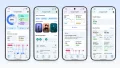
The most useful thing in Google Health 5.13 is a card, and it fixes a problem every screenless tracker owner knows: the device decides you are exercising, and you have no way to tell it that you are done.
Google posted the release notes for version 5.13 on Friday, and the update is rolling out in phases over the next week on both Android and iOS. It is a small release by version number and a surprisingly practical one by content.
The workout you can now stop
If you wear a Fitbit Air, a Fitbit Edge or a Pixel Watch and let automatic activity detection do its job, the Google Health app's Today screen now shows an exercise-in-progress card while a workout is being recorded. Tap it and you can end the session and see the summary on your own schedule.
That sounds trivial until you have lived with a device that has no screen. The Air detects that you are walking, running or cycling and starts logging, and until now the only feedback lived on your phone, after the fact. You would finish a 5K, look down at the app, and find it had given you seven extra minutes because it decided you were still moving while you were standing in the driveway.
The card does not turn the Air into a training watch. It is a confirmation and a stop button, which is about the right amount of interface for a tracker whose entire design argument is that it stays out of the way.
Swimming settings that should have existed already
Google has also added a default pool length and a unit preference for meters or yards, which finally makes pool distance behave like a setting rather than a guess. You will find it under your profile, then Google Health settings, then Activity preferences.
Anyone who swims in a 25-yard pool and has watched their distance come out wrong knows why this matters. Pool length was previously something you corrected per session, or ignored and lived with. Now it is set once and the watch uses it.
Step-by-step workouts reach older watches
The Pixel Watch 3, 4 and 5 now get live step-by-step guidance on the wrist during each exercise in a workout: sets, reps and rest periods, guided from the watch instead of the phone. We covered this feature when Google started that rollout with the November Pixel Drop, and what is new here is that it is now an official line in the Google Health release notes rather than a Pixel Drop addendum.
9to5Google notes that this shipped through the on-watch Google Health app, and that the rest of the November drop is still waiting on Wear OS 7.1.
The Apple Health fix
There is a bug fix in here that matters more than its billing. After the daylight saving time change, a small number of users found that Google Health had stopped sending some data to Apple Health. Version 5.13 is meant to restore that sync.
Google's guidance if you were affected: sign out of the Google Health app and sign back in to push the missing data across. That is worth doing rather than waiting, because a one-way sync problem can leave a permanent hole in your Apple Health history that later exports will faithfully reproduce.
Food search is improved too, which is the kind of line item that is boring to write about and genuinely annoying to live without.
What else is in the release
- Sex settings at onboarding now offer "Prefer not to say" and "An option not listed", after which Google asks whether you want metrics calculated from studies of cisgender men or cisgender women. You can change it later under Health, Personal info, Profile.
- The November 28 cutoff is repeated in the notes: from that date you can no longer install or update third-party apps and clock faces on Fitbit smartwatches, including the Sense, Sense 2 and the Versa line. We explained what that means for existing installs when Google first confirmed it.
The release also lands after a messy 5.12, which caused health metrics to vanish for some Fitbit users before a 5.12.2 patch. Our write-up of 5.12 covers that fix, and it is the reason to let 5.13 settle for a week rather than installing it the hour it appears.
Bottom Line
5.13 is a maintenance release with one genuinely good idea in it: giving people a way to stop a workout their tracker started on its own.
If you own a Fitbit Air or a Pixel Watch 5, update when the phased rollout reaches you. If you swim, set the pool length the same day. If your Apple Health numbers have had a gap since early November, the sign-out and sign-in trick is the fix, and it is worth doing before the gap gets older.
Sources: Google Health community release notes for 5.13, 9to5Google on the 5.13 rollout, 9to5Google on the Fitbit Air workout card, Droid Life, Gadgets and Wearables.